
Procure-to-Pay Purchase Approval Template
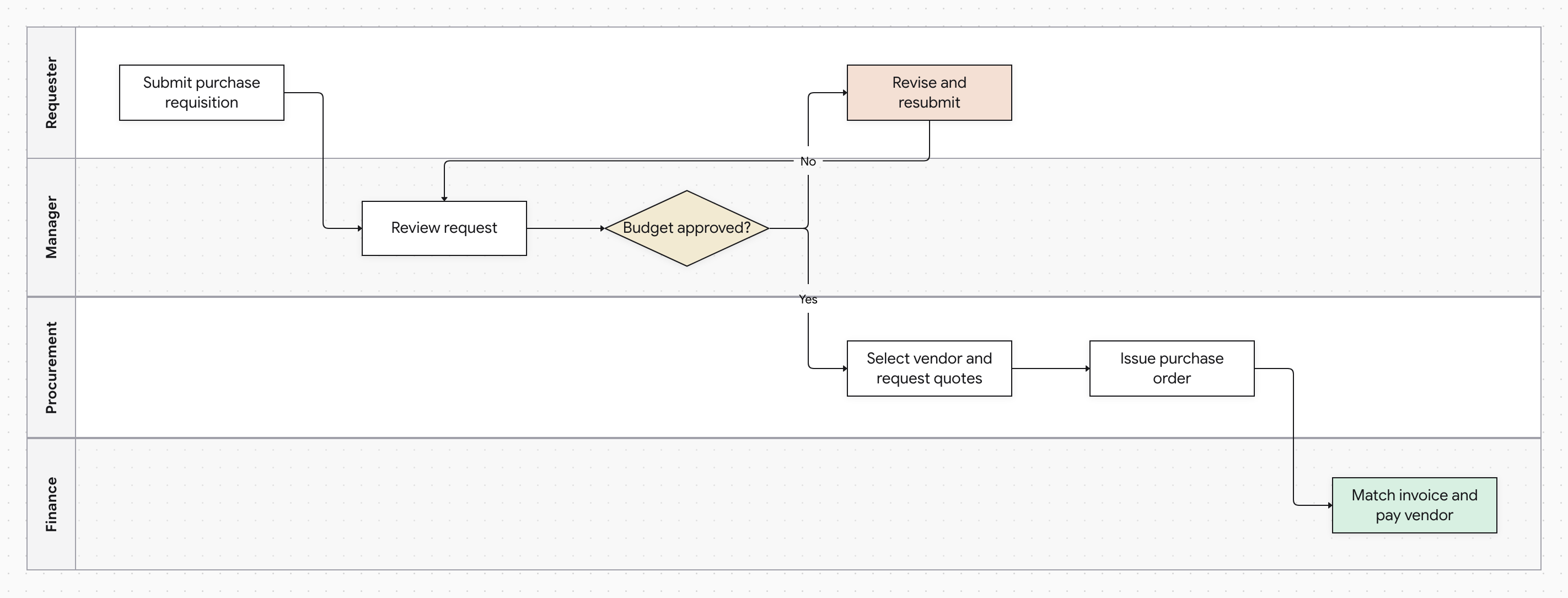
A purchase requisition approval process, from requisition to vendor payment, across Requester, Manager, Procurement and Finance lanes. The manager reviews the request and decides whether the budget is approved. A rejected request goes back to the requester to revise and resubmit, and an approved one moves to vendor quotes, a purchase order, and invoice matching and payment.
The process, step by step
The written procedure this diagram represents, in the order the steps happen.
- 1.
Requester: Submit purchase requisition
- 2.
Manager: Review request
- 3.
Manager: DecisionBudget approved?
- If No, go to step 4 (Revise and resubmit).
- If Yes, go to step 5 (Select vendor and request quotes).
- 4.
Requester: Revise and resubmit
- Go to step 2 (Review request).
- 5.
Procurement: Select vendor and request quotes
- 6.
Procurement: Issue purchase order
- 7.
Finance: Match invoice and pay vendor
Who's involved
Each role has its own lane in the diagram.
- Requester: 2 steps
- Manager: 2 steps
- Procurement: 2 steps
- Finance: 1 step