
SOP to Flowchart
Turn standard operating procedures into editable diagrams. Paste numbered steps, a RACI table, or a Word or PDF SOP, and Docugram generates an editable swimlane flowchart — multi-role SOPs get a lane per role automatically.
Built for process analysts documenting order-to-cash, onboarding, incident response, and more. One free try, no sign-in. 3 more after a free account. Export as PNG, SVG, or PDF.
Working in another language? Docugram reads SOPs written in Spanish, Portuguese, Hindi, and many more — and keeps your step labels in the original language.
How it works
Paste or upload your SOP
Paste numbered steps, a RACI table, or a checklist — or upload a Word or PDF SOP with a free account
AI maps the procedure
Our AI identifies each step, decision point, and who performs it — SOPs with two or more roles become swimlane diagrams
Edit & export
Edit, brand, and export your SOP flowchart for training, compliance, or documentation
SOPs analysts map to flowcharts
These are the standard operating procedures process analysts document and re-document most often. Each one links straight into the editor with a starter SOP you can adapt to how your organization actually runs.
Order-to-cash SOP
An order-to-cash SOP documents every step from a customer placing an order to the business collecting payment: order entry, credit check, fulfillment, shipping, invoicing, and cash application. Because sales, the warehouse, and finance each own part of the flow, Docugram renders it as a swimlane — one lane per role, each step in the lane of whoever performs it, and every handoff drawn as a routed connection. The decision branch for a failed credit check appears as a diamond that loops back to sales. The result is a cross-functional diagram that exposes the queue delays and approval gates a text SOP hides, and stays editable when the process changes.
Paste-in example
1. Sales enters the customer order
2. Finance runs a credit check
3. If credit fails, return to sales for revised terms
4. Warehouse picks and ships the order
5. Finance issues the invoice
6. Finance applies the received payment
Procure-to-pay SOP
A procure-to-pay SOP runs from identifying a purchasing need to paying the supplier: requisition, purchase-order approval, goods receipt, invoice matching (two- or three-way match), and payment. These steps span a requester, procurement, receiving, and accounts payable, so Docugram builds a swimlane with a lane for each. Approval thresholds and the three-way match become explicit decision diamonds, and invoices that fail the match branch off to an exception lane instead of disappearing into an email thread. Analysts use the diagram to document the controls that stop duplicate or unauthorized payments and to onboard new AP staff without a ten-page manual.
Paste-in example
1. Requester submits a purchase requisition
2. Manager approves against the budget threshold
3. Procurement issues the purchase order
4. Receiving records goods receipt
5. AP runs a three-way match of PO, receipt, and invoice
6. If the match fails, route to exception handling; otherwise pay the supplier
Employee onboarding SOP
An employee onboarding SOP is the sequence a new hire moves through from signed offer to fully productive: IT provisioning, payroll and benefits enrollment, compliance training, and manager check-ins across the first 30, 60, and 90 days. HR, IT, and the hiring manager each own steps, so Docugram draws a swimlane that makes every handoff visible — HR triggers provisioning, IT sets up accounts and equipment, the manager runs check-ins. Turning the SOP into a swimlane stops accounts, hardware, and paperwork from slipping through the cracks, and gives HR a diagram they can update each time a tool or policy changes rather than re-drawing from scratch.
Paste-in example
1. HR confirms the accepted offer
2. IT provisions accounts and equipment
3. HR enrolls the hire in payroll and benefits
4. Hire completes compliance training
5. Manager runs 30/60/90-day check-ins
Change management SOP
A change management SOP governs how a proposed change to a system, process, or product is requested, assessed, approved, and implemented: change request, impact and risk assessment, change advisory board (CAB) approval, scheduled implementation, and a post-change review. The CAB decision is a natural branch — approved changes proceed to scheduling, rejected ones return to the requester — so the diagram reads as a flowchart with a clear approval gate, or a swimlane when several teams own separate steps. Documenting it as a visual keeps changes controlled and reversible, and gives auditors a single picture of who signed off and when.
Paste-in example
1. Requester submits a change request
2. Assess impact and risk
3. CAB reviews the change
4. If rejected, return to the requester for rework
5. Schedule and implement the approved change
6. Conduct a post-change review
Incident response SOP
An incident response SOP is the runbook a team follows when a service disruption, security event, or quality failure occurs: detection, triage and severity classification, containment, resolution, and a post-incident review or root-cause analysis. Severity classification branches the flow — a Sev-1 pages on-call and escalates, a Sev-3 goes to the normal queue — and when responders, on-call engineers, and an incident commander each own steps, Docugram renders it as a swimlane so escalation paths are unambiguous under pressure. The finished diagram doubles as a training artifact and a compliance record, and stays editable as the team refines its escalation thresholds.
Paste-in example
1. Monitoring detects an incident
2. On-call triages and classifies severity
3. If Sev-1, page the incident commander and escalate
4. Contain the impact
5. Resolve and restore service
6. Run a post-incident root-cause review
Quality control / inspection SOP
A quality-control or inspection SOP verifies that a product, batch, or process meets defined standards before it moves forward: sampling or inspection, a pass/fail decision, non-conformance handling, corrective action, and final sign-off. The pass/fail check is the core decision node — passing units proceed, failing ones route to non-conformance and corrective action before re-inspection. When an inspector, a supervisor, and a QA lead each own steps, Docugram draws a swimlane so every approval and rework loop is traceable. Analysts document these to keep audit trails consistent and defensible, and to make the escape path for defects obvious to everyone on the line.
Paste-in example
1. Inspector samples the batch
2. Inspector measures against the spec
3. If it fails, log a non-conformance
4. Supervisor assigns corrective action
5. Re-inspect the reworked units
6. QA lead signs off and releases the batch
Customer onboarding SOP
A customer onboarding SOP is the workflow that takes a newly signed customer from contract to first value: kickoff, account and access setup, data migration or configuration, training, and go-live handoff to the account or success team. Sales, onboarding, and customer success each own a stretch of the flow, so Docugram renders it as a swimlane that shows exactly where the customer is handed from one team to the next. Mapping it keeps every new account moving through the same repeatable steps, shortens time-to-value, and gives the success team a diagram they can adapt per segment instead of relying on tribal knowledge.
Paste-in example
1. Sales hands off the signed account to onboarding
2. Onboarding schedules a kickoff call
3. Onboarding provisions accounts and access
4. Migrate or configure the customer's data
5. Train the customer's team
6. Hand off to customer success at go-live
Example SOP flowcharts
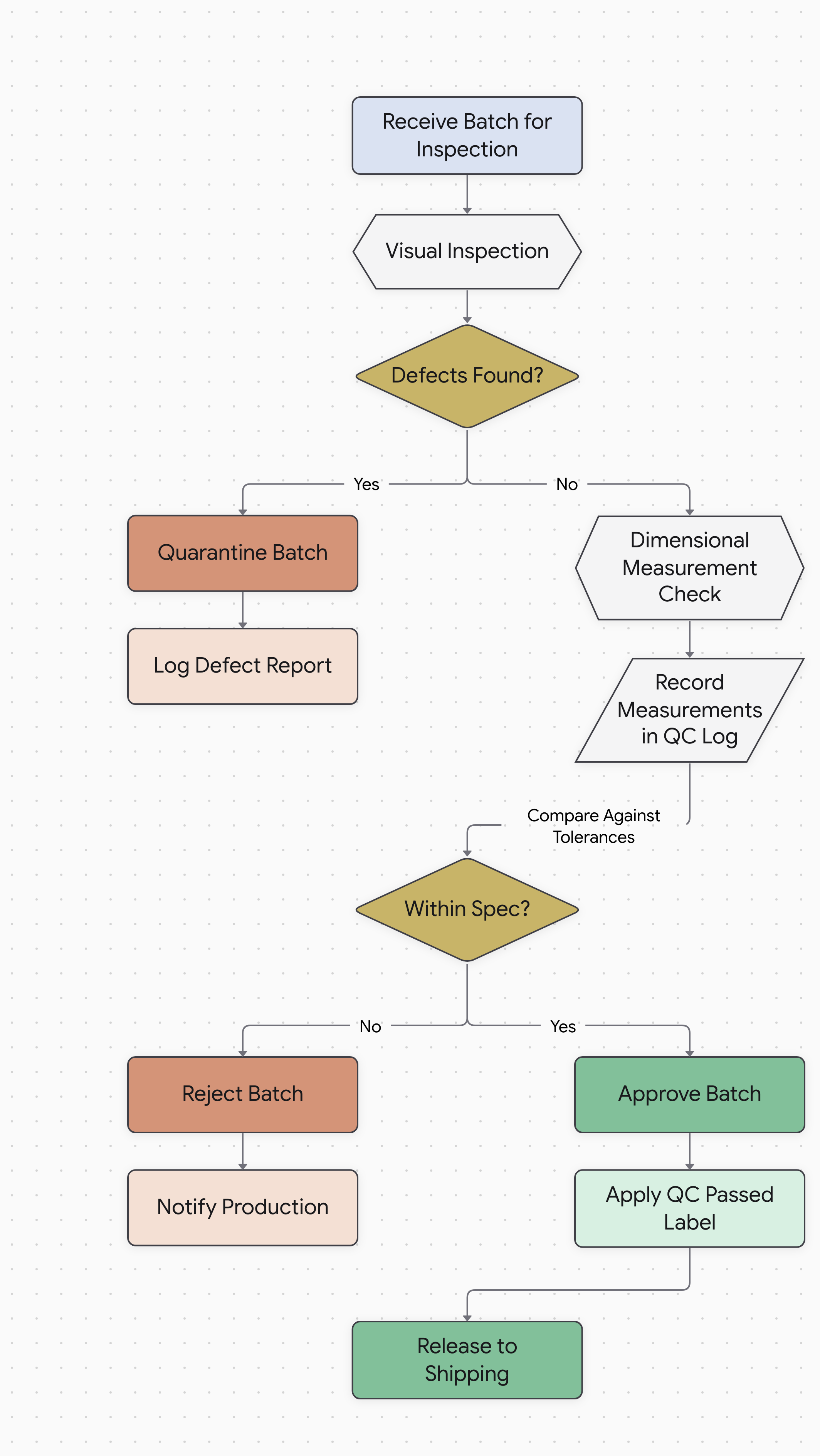
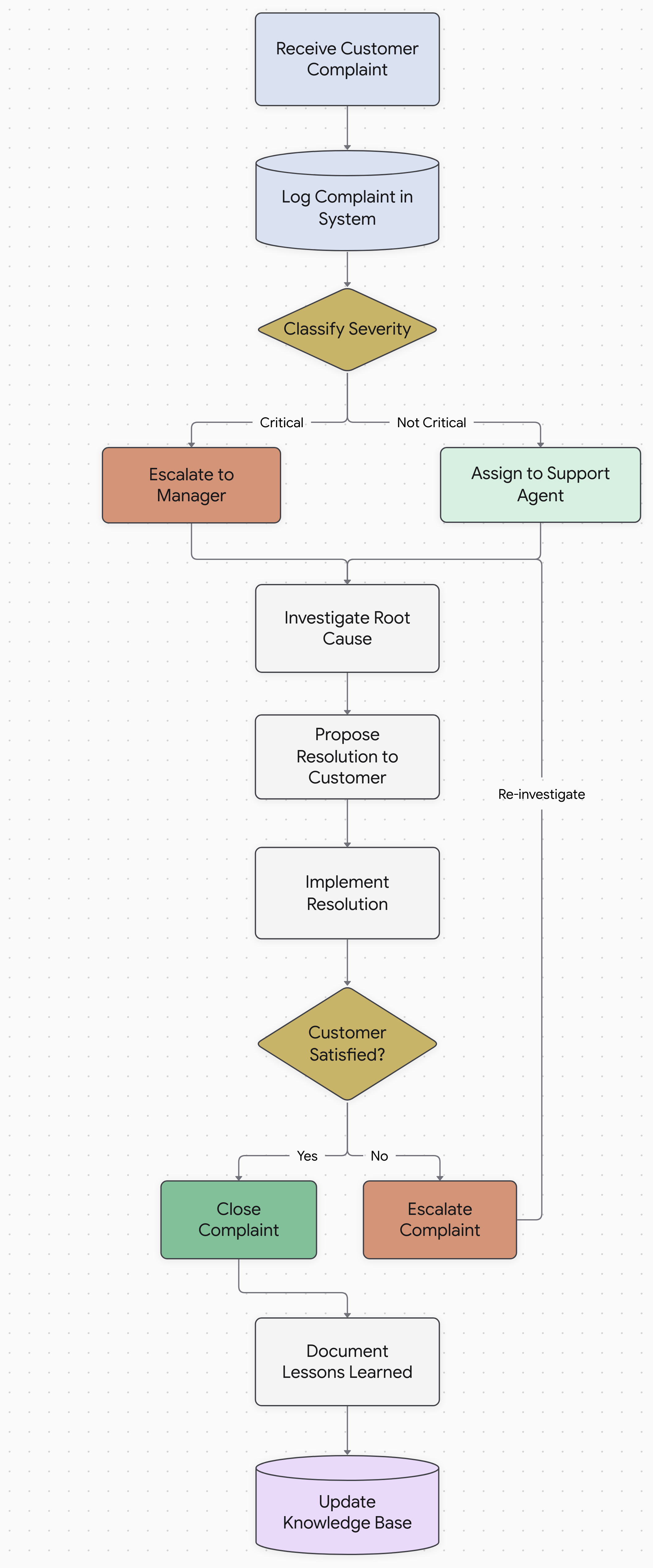
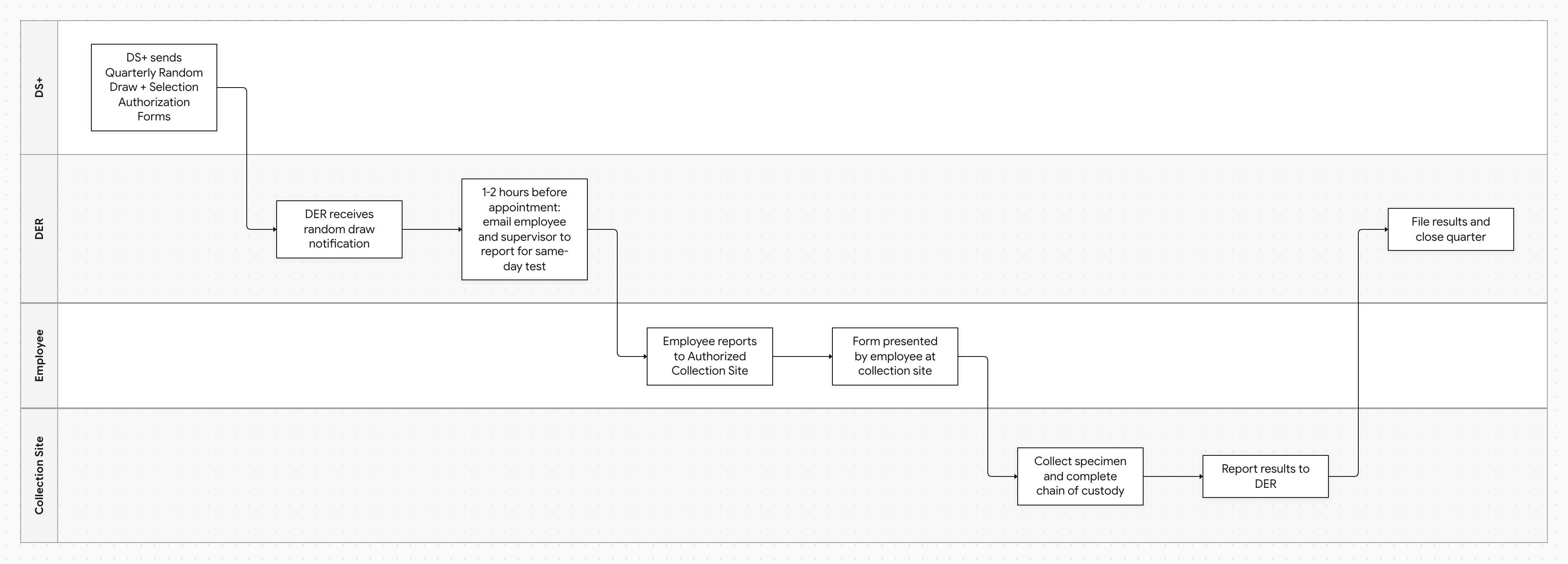
Standard operating procedures are essential for consistency, training, and compliance — but long text-based SOPs are hard to follow and even harder to audit. Converting an SOP to a flowchart makes each step clear, highlights decision points, and helps teams spot gaps or redundancies in their processes.
Docugram's SOP-to-flowchart tool works with any procedure format. Paste a numbered checklist, a RACI table, a detailed multi-stage procedure with conditional steps, or upload a Word or PDF SOP. The AI builds a structured flowchart that you can refine, export as PDF for print, or share with your team digitally. Teams in healthcare, manufacturing, IT, finance, and compliance use SOP flowcharts for onboarding, audits, and process improvement.
Most real SOPs involve more than one person — a technician performs the work, a supervisor signs off, a coordinator files the paperwork. When the AI detects two or more roles in your procedure, it renders a swimlane diagram instead of a plain flowchart: each role gets a horizontal lane, each step sits in the lane of the person who performs it, and every handoff between roles is visible at a glance.
Frequently Asked Questions
How do I convert an SOP document to a flowchart?
Paste your SOP text — numbered steps, a RACI table, or a copied procedure — into Docugram and it builds an editable flowchart in seconds. You can also upload a Word or PDF SOP with a free account. SOPs that involve two or more roles are rendered as swimlane diagrams automatically, and you can edit any node and export as PNG, SVG, or PDF.
Can I convert a Word SOP to a diagram?
Yes. Upload a Word (.docx) or PDF SOP, or paste the text directly. Docugram reads the procedure, identifies each step and decision point, and renders an editable diagram. Document uploads require a free account; plain-text prompts work with one free try first.
How do I map an order-to-cash SOP?
Paste your order-to-cash steps — order entry, credit check, fulfillment, invoicing, and cash application. Because sales, the warehouse, and finance each own part of the flow, Docugram renders it as a swimlane with a lane per role and a decision branch for failed credit checks. See the order-to-cash section above for a paste-in example.
What's the best way to turn an employee onboarding SOP into a swimlane?
Employee onboarding involves HR, IT, and the hiring manager — two or more roles — so Docugram renders it as a swimlane automatically, with a lane for each role and every handoff drawn between them. Paste your onboarding steps or start from the employee onboarding example above.
Does Docugram support SOPs written in languages other than English?
Yes. Docugram reads SOPs written in many languages — including Spanish, Portuguese, and Hindi — and keeps your step labels in the original language rather than translating them.
Want lanes for every role in your process? Try our swimlane diagram generator
Working with a longer document? Try our document to flowchart converter
Mapping a broader business process? Try our process flowchart generator
Want the general-purpose tool? Try our flowchart generator from text
See also: converting raw text to diagrams — read the convert text to diagram guide
Turn your SOP into a flowchart now
Paste your standard operating procedure and get an editable diagram. Free to start — 3 generations on signup.
Open the editor