
Order-to-Cash Flowchart Generator
Turn your order-to-cash (O2C) SOP into an editable flowchart. Paste the steps — quote, order, fulfillment, invoice, collection, and reconciliation — and Docugram maps the whole cycle, drawing a lane per role and a decision branch at every credit check and approval gate.
Built for process analysts who document and re-document O2C across sales, the warehouse, and finance. One free try, no sign-in. One more with a free account. Export as PNG, SVG, or PDF.
Working in another language? Docugram reads order-to-cash SOPs written in Spanish, Portuguese, German, and many more — and keeps your step labels in the original language.
How it works
Paste your O2C SOP
Paste your order-to-cash steps — or one stage at a time — or upload a Word or PDF SOP with a free account
AI maps the cycle
Docugram identifies each stage, the credit-check and approval decisions, and who owns each step — multi-role O2C becomes a swimlane
Edit & export
Edit, brand, and export your O2C flowchart for training, controls documentation, or process reviews
Order-to-cash, stage by stage
Order-to-cash runs from a customer's first quote request to the final reconciled payment. Most O2C SOPs cover these six stages, though yours may split or merge them. Each one has SOP text you can paste in and the kind of flowchart to expect from it.
1. Quote
Order-to-cash starts before the order exists: a customer requests pricing and sales issues a quote. The quote stage covers capturing requirements, pricing against the current price list or contract, applying discounts within an approval threshold, and sending the quote for the customer's acceptance. Because a discount above the threshold routes to a manager, this stage is where the first decision diamond appears. Docugram renders it as the opening branch of the O2C flow — quote requested, priced, and either auto-approved or escalated for sign-off before it can convert to an order.
Paste-in SOP snippet
1. Customer requests a quote
2. Sales prices the line items against the price list
3. If the discount exceeds the threshold, route to manager approval
4. Send the approved quote to the customer
What to expect
2. Order
When the customer accepts the quote, it converts to a sales order. The order stage covers order entry, validating the customer's account and payment terms, and running a credit check before the order is released to fulfillment. The credit check is the make-or-break gate of the whole O2C cycle: a passed check releases the order, a failed one returns it to sales for revised terms or prepayment. Docugram maps this as a swimlane handoff — sales enters the order, finance runs the credit check, and the branch back to sales is drawn explicitly so the failure path is never hidden.
Paste-in SOP snippet
1. Sales converts the accepted quote into a sales order
2. Validate customer account and payment terms
3. Finance runs a credit check
4. If credit fails, return to sales for revised terms
5. Release the approved order to fulfillment
What to expect
3. Fulfillment
Fulfillment is where the warehouse turns a released order into a shipment: allocating stock, picking and packing, arranging carrier pickup, and shipping. Back-orders branch out here — if an item is out of stock, the line routes to a back-order queue instead of shipping. Because fulfillment is owned by the warehouse rather than sales or finance, Docugram places it in its own lane, with the inventory-availability check as a decision node and the back-order path drawn as a separate branch that rejoins the flow once stock arrives.
Paste-in SOP snippet
1. Warehouse receives the released order
2. Check inventory availability
3. If out of stock, route to the back-order queue
4. Pick and pack the order
5. Arrange carrier pickup and ship
What to expect
4. Invoice
Once the order ships, finance issues the invoice. The invoice stage covers generating the invoice from the shipped quantities, applying taxes and any contract-specific terms, and sending it to the customer through their preferred channel — email, portal, or EDI. This is a mostly linear finance-owned stretch, but it is where mismatches between what was ordered, shipped, and priced surface, so a validation step branches invoices with discrepancies to a review queue. Docugram draws the invoice stage as a finance-lane sequence with a discrepancy check before the invoice is released to the customer.
Paste-in SOP snippet
1. Finance generates the invoice from shipped quantities
2. Apply taxes and contract terms
3. Validate the invoice against the order and shipment
4. If there is a discrepancy, route to invoice review
5. Send the invoice to the customer
What to expect
5. Collection
Collection is the accounts-receivable stage: tracking the invoice against its due date and following up until the customer pays. The dunning logic is the core branch — an invoice paid on time closes cleanly, while an overdue one enters a reminder-and-escalation loop that repeats until payment or write-off. Docugram renders collection as a decision loop rather than a straight line: the due-date check feeds a follow-up cycle, and each reminder step routes back to the check so the escalation path (first reminder, second reminder, collections escalation) is explicit and auditable.
Paste-in SOP snippet
1. Track the invoice against its due date
2. If paid on time, proceed to reconciliation
3. If overdue, send a payment reminder
4. If still unpaid, escalate to collections
5. Record the received payment
What to expect
6. Reconciliation
Reconciliation closes the order-to-cash loop: finance applies the received payment to the correct invoice, matches it against the accounts-receivable ledger, and resolves any short-pays, over-pays, or unapplied cash before the order is marked closed. Deductions and disputes branch off to a resolution step here rather than being written off silently. Docugram maps reconciliation as the final finance-lane stage with a match decision — a clean match closes the order, a mismatch routes to a cash-application exception queue — so the point where money and paperwork are supposed to agree is drawn as an explicit, checkable gate.
Paste-in SOP snippet
1. Apply the received payment to the open invoice
2. Match the payment against the AR ledger
3. If the amounts match, close the order
4. If there is a short-pay or deduction, route to dispute resolution
5. Post the reconciled entry to the general ledger
What to expect
Order-to-cash in your language
International finance and ops teams use the same O2C terminology across languages. Paste your SOP in Spanish, Portuguese, or German and Docugram keeps every step label in the original language instead of translating it.
Order-to-cash SOP in Spanish (Español)
Proceso Order-to-Cash:
1. Ventas genera la cotización para el cliente
2. El cliente confirma el pedido
3. Finanzas realiza la verificación de crédito
4. Si el crédito falla, devolver a Ventas para revisar los términos
5. Almacén prepara y despacha el envío
6. Finanzas emite la factura
7. Finanzas registra la cobranza y concilia el pago
Try this Spanish example
Order-to-cash SOP in Portuguese (Português)
Processo Order-to-Cash:
1. Vendas gera a cotação para o cliente
2. O cliente confirma o pedido
3. Finanças executa a análise de crédito
4. Se o crédito falhar, devolver para Vendas revisar as condições
5. Expedição separa e envia a mercadoria
6. Finanças emite a nota fiscal
7. Finanças registra o recebimento e concilia o pagamento
Try this Portuguese example
Order-to-cash SOP in German (Deutsch)
Order-to-Cash-Prozess:
1. Vertrieb erstellt das Angebot für den Kunden
2. Kunde bestätigt die Bestellung
3. Finanzabteilung führt die Bonitätsprüfung durch
4. Wenn die Bonität nicht ausreicht, zurück an den Vertrieb für neue Konditionen
5. Lager kommissioniert und versendet die Ware
6. Finanzabteilung stellt die Rechnung
7. Finanzabteilung bucht den Zahlungseingang und führt die Kontenabstimmung durch
Try this German example
Example order-to-cash flowcharts
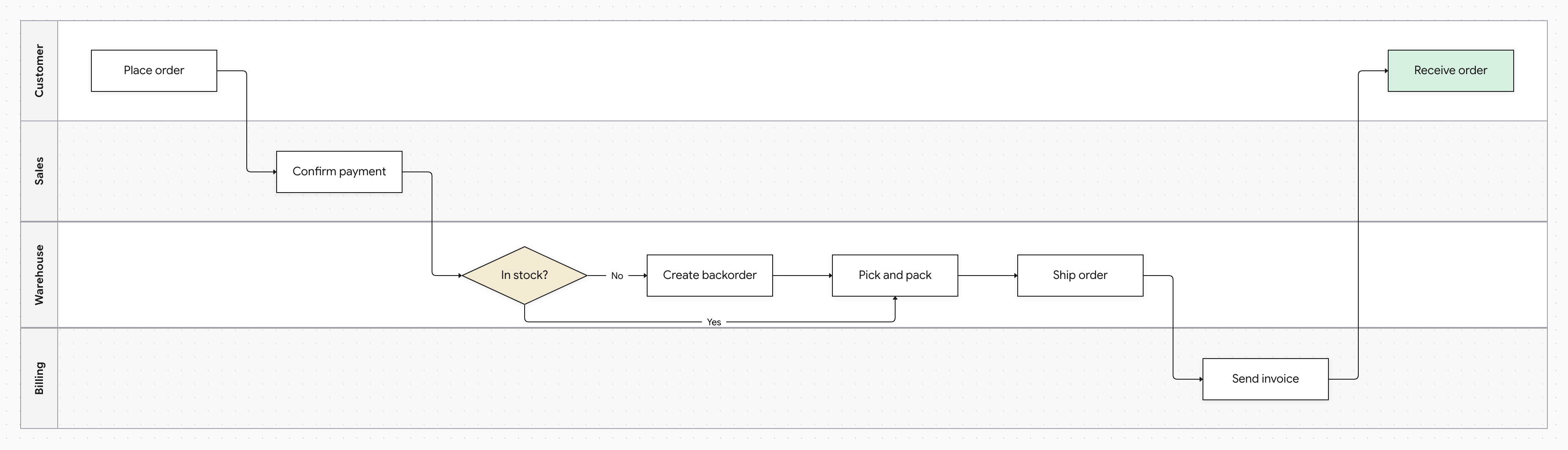
Order-to-cash swimlane for an order paid up front: Customer, Sales, Warehouse, and Billing lanes, with a stock check that creates a backorder.
Open this template in Docugram →See the order-to-cash template page →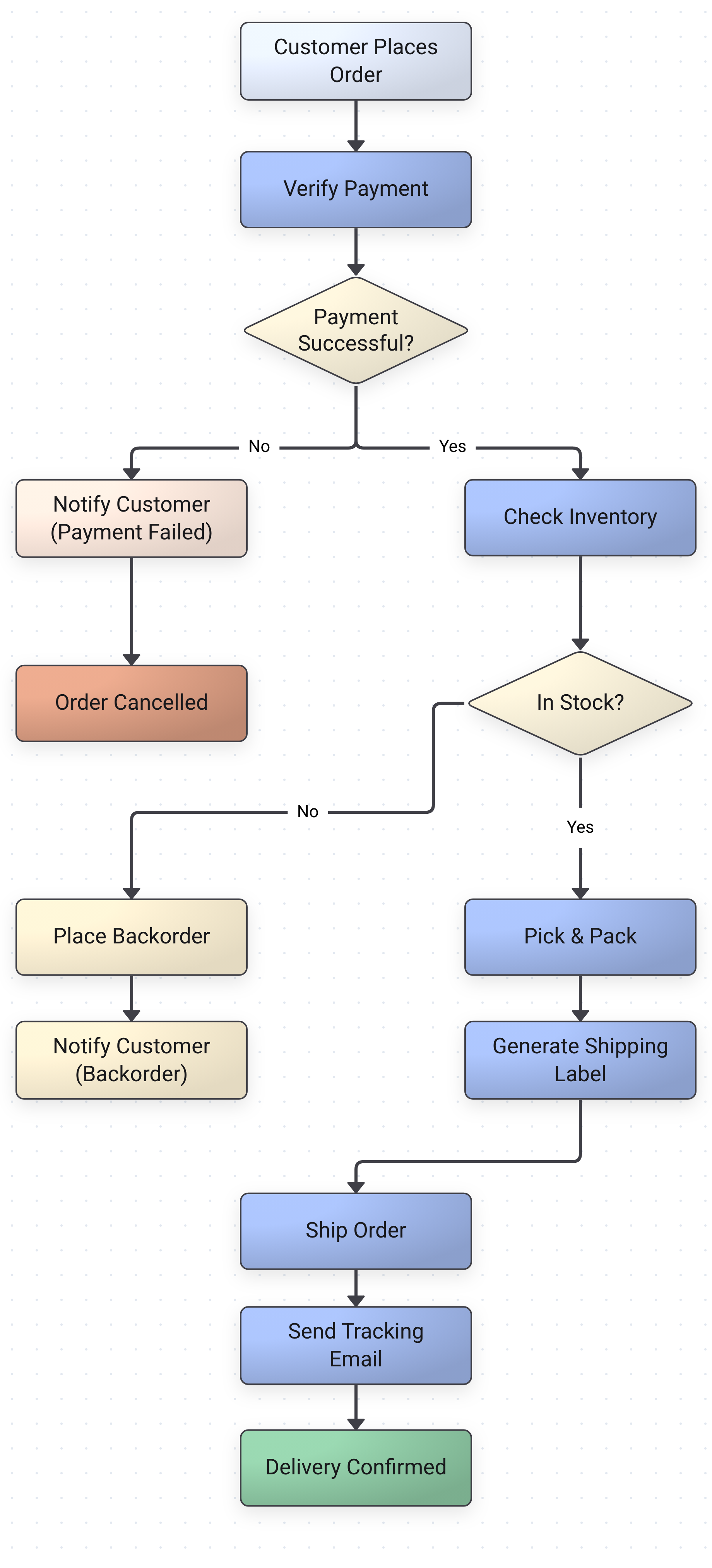
Order fulfillment flowchart: payment check, stock check with backorder, pick and pack, and shipping.
Open this template in Docugram →An order-to-cash flowchart is the single clearest way to see how an order actually moves through your business. The text version of an O2C SOP hides the queue delays, the approval gates, and the handoffs between sales, the warehouse, and finance — a diagram makes them impossible to miss. Analysts use O2C flowcharts to expose where cash gets stuck, to document the controls that prevent orders shipping to bad-credit customers, and to onboard new staff without a twenty-page manual.
Because most of the O2C cycle spans more than one role, an SOP that names who does each step usually comes out as a swimlane: sales owns the quote and order entry, finance owns the credit check, invoicing, collection, and reconciliation, and the warehouse owns fulfillment. Every credit check, discount approval, and payment match you write as a condition becomes a decision node, and its failure path — failed credit, back-order, invoice discrepancy, short-pay — is drawn rather than left implied. When the process changes, paste the new version and re-diagram in one step instead of redrawing from scratch.
Order-to-cash flowchart FAQ
What is an order-to-cash flowchart?
An order-to-cash (O2C) flowchart is a diagram of the cycle from a customer requesting a quote to the business collecting and reconciling payment. A common breakdown is quote, order, fulfillment, invoice, collection, and reconciliation, and the diagram shows the credit checks, approval gates, and role handoffs that a text SOP leaves implicit. Paste your O2C steps into Docugram and it builds an editable version.
How does order-to-cash differ from quote-to-cash?
Quote-to-cash (QTC) is the broader cycle: it starts earlier, with configuring, pricing, and quoting a deal (CPQ), and then flows into everything order-to-cash covers. Order-to-cash is usually described as beginning when an order is placed and running through fulfillment, invoicing, and cash application. In practice the two overlap heavily, and the examples on this page include a quote stage, so they work whether your SOP is framed as O2C or QTC.
What are the stages of order-to-cash?
Companies divide the cycle differently, but a common breakdown has six stages: quote (pricing and sending a quote), order (order entry and credit check), fulfillment (pick, pack, and ship), invoice (billing the customer), collection (following up until payment), and reconciliation (applying and matching the payment, then closing the order). You can diagram a single stage or paste the whole cycle. When your steps say who does each one, Docugram can lay the diagram out as a swimlane with a lane per role.
How do I diagram O2C exceptions like failed credit checks or short-pays?
Write the exception as a conditional step, such as “if the credit check fails, return to sales for revised terms” or “if there is a short-pay, route to dispute resolution”. Docugram turns a conditional step into a decision with the failure path drawn as its own branch, so failed credit checks, back-orders, invoice discrepancies, and deductions show up on the diagram instead of in footnotes.
Can I generate an order-to-cash flowchart from an SOP in another language?
Yes. Docugram reads order-to-cash SOPs written in Spanish, Portuguese, German, and many other languages, and keeps your step labels in the original language rather than translating them. The examples on this page include O2C SOPs in Spanish, Portuguese, and German you can paste in and adapt.
Is the order-to-cash flowchart generator free?
You get one free try with no sign-in, and one more generation with a free account. After that, a $7 Day Pass gives you 24 hours of unlimited diagrams with no subscription, or Pro is $12/month. Free accounts can edit any node and export PNG, SVG, or PDF with a small watermark; a Day Pass or Pro removes it.
Mapping other named SOPs? See the full SOP flowchart generator
Documenting a broader business process? Try our process flowchart generator
Want lanes for every role in your O2C flow? Try our swimlane diagram generator
See also: converting raw text to diagrams — read the convert text to diagram guide
Turn your order-to-cash SOP into a flowchart
Paste your O2C procedure and get an editable diagram of the whole cycle. One free try, no sign-in.
Open the editor